Use your Galaxy S2 as a Portable Wifi Hotspot

Posted by Unknown Senin, 23 Januari 2012 0 komentar
One very nice feature of the Galaxy S2 (and some other phones in the Galaxy range), is the ability to use it as a portable wifi hotspot! This is fortunately very easy and simple to set up!

Go into your phone's settings:


There, tap on "Wireless and network", which brings you to this screen:


Here, tap on "Tethering and portable hotspot", which takes you here:


Now tap on "Portable Wi-Fi hotspot settings":


On this screen you can enable your wifi hotspot, and also configure the security settings and stuff like that for the phone:


I'd highly recommend using WPA2 PSK as your security setting, otherwise anyone in range can connect to your phone, and with the ludicrous data rates out there, this can get costly, REAL quick!

Now simply connect with your laptop/tablet/other cellphone to your phone's wifi hotspot, enter the password, and you should be good to go! Very handy for if you don't have a 3g dongle or built-in 3g in your laptop. Also if you're in South Africa, free wifi hotspots are a very scarce thing - also, the ones that do exist almost never work!

Enjoy!

Baca Selengkapnya ....

How to make one of your MP3 files a ringtone

Posted by Unknown 0 komentar
If you have the Samsung Galaxy S2 (or any other Galaxy range I'd reckon...), setting one of your music files as a ringtone isn't as straight forward as it should be.

One would think that to do this, you need to browse to the file with the file manager, but that doesn't give you the option to make a specific mp3 a ringtone.

You can do this, however... You need to do it from the built in Music app.

First is to go to and play the mp3 you would like to make your ringtone:


Now tap on the bottom left button of the phone (uhm, I don't know what to call that button actually haha! It's to the left of the home button in the middle on the phone) - this will bring up the options for the screen you're currently on, like so:


One of the options there is "Set as" - tap on that, which will give you this screen:


And voila, select the appropriate option, and you can now listen to Metallica whenever someone calls you :)

Baca Selengkapnya ....

Wireless Power Chief v1.0.9

Posted by Unknown Senin, 16 Januari 2012 0 komentar

Wireless Power Chief v1.0.9


Wireless Power Chief v1.0.9 apk

Requirements: Android 2.1

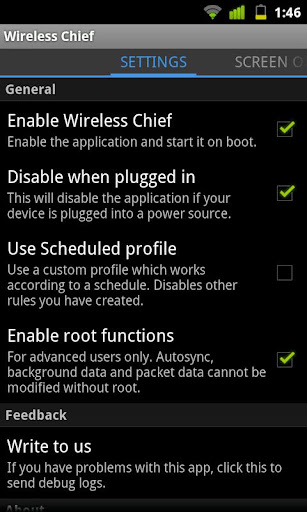
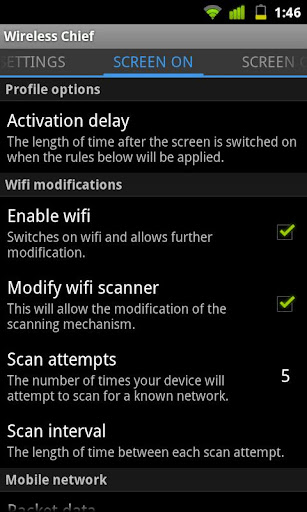
Overview: Wireless Chief is an application designed to control the wifi and data radios in your device, as well as many related functions like background data and autosync.


Wireless Power Chief v1.0.9


Wireless Chief is an application designed to control the wifi and data radios in your device, as well as many related functions like background data and autosync. It can be used to save power or minimize data usage, and works either by reading the screen state or on a completely custom schedule.

This version of the app will give you full access to the Screen state-based profiles. Scheduled and Battery state profiles can be unlocked by purchasing the Key.

All data and sync options require root access. There is no other way to manipulate the radios.

Features:

Wireless Power Chief v1.0.9 apk

- Turn features on or off depending on screen state

- Disable wifi if no known network is available

- Change wifi scan intervals and scan attempts to save juice

- Schedule autosync and background data

- Force autosync on wifi only

- Manage radios according to battery level

- Disable push entirely

If you have issues or suggestions, please use the “Write to us” dialog.

Please be aware, this is app is all about those all important radios and will never have CPU stepping or any other nonsense not pertinent to wireless control.

Its still a great alternative to applications like Juice Defender and Battery Saver.

What it will have is the most comprehensive radio suite possible, because in our experience all the real power and hassle savings are there.


Free Wireless Power Chief v1.0.9 apk


Download


Related Posts Plugin for WordPress, Blogger...

Baca Selengkapnya ....

Go Locker Windows 8 v2.0

Posted by Unknown 0 komentar

Go Locker Windows 8 v2.0


Go Locker Windows 8 v2.0 apk

Requirements: Android 1.6+

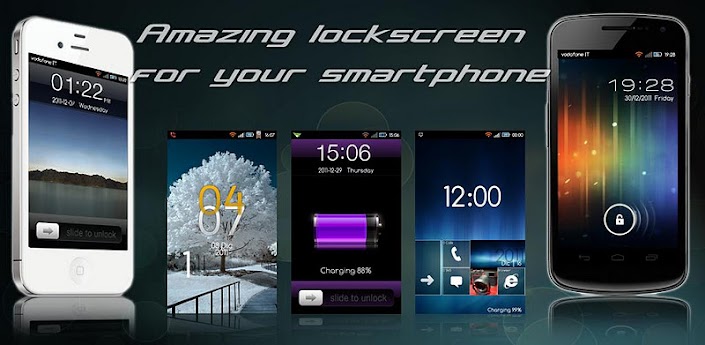
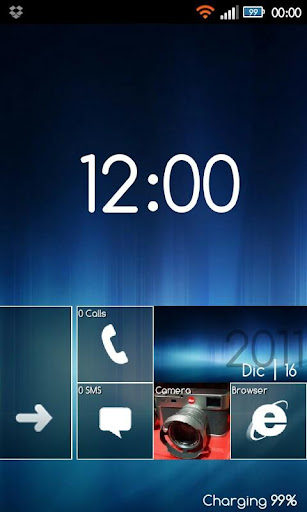
Overview: Amazing lockscreen for your smartphone


Go Locker Windows 8 v2.0


Amazing lockscreen for your smartphone


Windows 8 GO LAUNCHER EX LOCKER THEME developed by Alle46


*DO NOT open from market! Apply by Go Locker *


If you have any kind of problems, contact me at italianlabs@gmail.com, so I can answer to you! (I cant answer at comment)

Leave a feedback and a score please!

Follow us on FB: https://www.facebook.com/pages/ItalianL … 4545344658


ItalianLab.


====>Tips:

1. Make sure GO Launcher EX V2.67 or above and GO Locker v1.05 have been installed;

2. Click “MENU—->Preferences—->Theme Settings—->GO Locker—->My locker” to choose the theme;


Tested on resolution 480 x 800.


Free Go Locker Windows 8 v2.0 apk


Download


Related Posts Plugin for WordPress, Blogger...

Baca Selengkapnya ....

DXHome v3.0.2

Posted by Unknown 0 komentar

DXHome v3.0.2


DXHome v3.0.2 apk

Requirements: ANDROID 2.1 and up

Overview: DXHome, a highly customized home replacement app., is a perfect home company with Android phones.


DXHome v3.0.2


It is created by the Dianxinos Enterpriser team in Innovation Works invested by Dr. Kaifu Lee. Highly customizable with various themes, colorful desktop transitions, easy operating……, just like its name in Chinese, Dianxin is making the home of your Android phone colorful and enjoyable!


What could you get from DXHome?

1)So many themes to enjoy!

Want your phone to change with your mood?! Try themes we designed for you!

DXHome presents its first six themes of totally different styles!

NO.1 Dianxin Default Desktop Theme— it is peaceful, clear, warm……, all the nice feelings DXHome wants you to feel. Name it by yourself. It’s our gift~^-^~

NO.2 Midsummer Theme— get fidgety from the hate outside? Pick some cool and fresh air here!

NO.3 Cake Theme— are you a foody? How about some candy and cakes now~^-^~ Try it and tell us how it’s like? DXHome is “cooking” more and more for you if you like~

NO.4 Batman— a big Batman fan? Here he comes! COOL!

NO.5 Clothing— want your phone to be cute? DXHome makes suit for your icon! Try it on!

NO.6 Tree & Shadow— at the end, come and sit down beside the tree, just enjoy the peaceful nightfall now.

Not enough? Download the one you want from Internet! This the privilege Dianxin provides specially for you! With DXHome, you could always make your phone to be YOUR STYLE! Yeah, phone might be changed overtime, but your style could last forever with DXHome!


2)What is it like when you swipe your desktop screens??

Here DXHome provides you extremely smooth experience and its first series of desktop transitions! Just swipe! You will be surprised!

3)App. Drawer—Long press any icon in App Drawer, add to Home screen or delete it. Yeah, Soooo easy!

4)Screens Editor— add, delete or remove any icon, create or edit any shortcuts to apps? It’s YOUR choice now!

By the way, don’t forget to add the weather widget designed by sweet Dianxin, both beautiful and useful!! That’s true!

5) Folder—can’t be any easier to create a new folder, just put two icons together. DXHome will create a folder automatically as you want!


What’s new?

DXHome v3.0.2 apk

1, the new system to support android 4.0

2, optimization of the bottom of the banner mode, place three, four, five as you choose;

3, the new list of applications to set new “background setting”, choose from a variety of background you may be;

4, the new desktop settings a lot of settings: set icon size, icon arrangement settings, etc.;

5, the new list into the application of special effects, “Aladdin”;

6, new features added “3D screen preview”, click marker point or press the application icon into the list;

7, the new plug-in entrance skin quickly: Press to enter the edit mode can see the desktop, plug-peeling easier;

8, even after adding to hide the notification bar pulled out from under the top notification bar quickly;

9, three new sets of New Year’s theme, New Year new atmosphere for your phone installed it put the New Year;

10, add 2 sets of clock leather skin, dragon clock, I wish you the spirit of the Rabbit;

11, support the revised weather city selection, support for 3D flip effect;


Free DXHome v3.0.2 apk


Download


Mirror


Related Posts Plugin for WordPress, Blogger...

Baca Selengkapnya ....

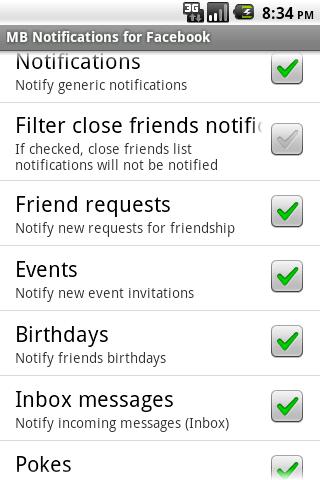
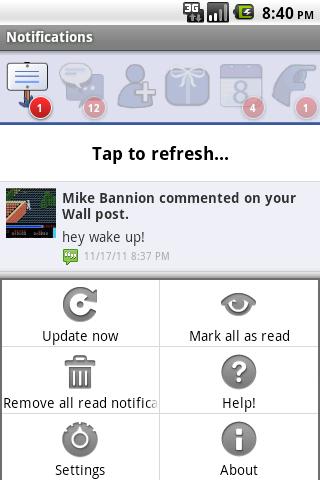
MB Notifications for Facebook v1.8.1

Posted by Unknown 0 komentar

MB Notifications for Facebook v1.8.1


MB Notifications for Facebook v1.8.1 apk

Requirements: Android 1.6

Overview: Facebook Notifications for your Android device!


MB Notifications for Facebook v1.8.1


REALLY IMPORTANT: If you have any issue, things don’t work as you expected or whatever else, please don’t complain on the market since I have no way to help you out there: contact me in any of the following ways, I answer to everyone. The web page http://mikebannion.altervista.org/fb.html contains useful information related to the application. For any issue not reported there, or just if you want to tell me what you think of the application, feel free to contact me at mikebannionsw@gmail.com.


Let’s face it, when it comes to Android, whether you like the official Facebook application or not it has one major flaw: no notifications! And this is even more true when you don’t use any app for Facebook at all but just the browser, and yet want to keep updated. I frankly hate this: why would you have to check for updates yourself when you could get automatically notified whenever a notification from your Facebook account arrives, just as iPhone users do?

I decided to solve this issue for my own convenience, and so this is where this app chimes in: a lightweight and fast application to get notifications from Facebook, what you decide, at the interval you decide and reported as you decide. Nothing else, just as plain and simple as effective! Decide how to view the notifications:

* open it in the official Facebook app, if installed;

* open it in FriendCaster (either Free or Pro) if installed;

* open it in Seesmic, if installed;

* open it in the browser (either full view, Touch or WAP version);

* or just open any other app you have installed (just opening the main activity of app, no custom behaviour)

The service can be started automatically at boot if you want, and a 1×1 widget is provided as well to explicitly request new notifications should you want to. A 4×1 widget is also available to show counters of unread notifications. (NOTE: the widgets will NOT work if you move the app to SD). Notifications can be received in the notifications bar and as popup dialogs (by also unlocking and/or waking the screen, if necessary). Details on all the required permissions are at the end of this page.


IMPORTANT: the app only gets NEW and UNREAD notifications, meaning it won’t download, for example, all the notifications you already saw before launching the app or between refreshes.


Icon set realized by Elisa! (eli.palmiotto@gmail.com)

Thanks to Matthew for the Gingerbread status bar icons!

Spanish translation realized by Luis López Moreno (lulomo18@gmail.com; http://www.llmgraphics.com)

Pull to refresh implemented thanks to this library: https://github.com/johannilsson/android-pulltorefresh


This application is not affiliated with Facebook. Facebook is a registered trademark of Facebook, Inc.


PERMISSIONS EXPLAINED:

* android.permission.INTERNET: to get notifications from Facebook;

* android.permission.VIBRATE: for the optional vibrate functionality in notifications;

* android.permission.ACCESS_NETWORK_STATE: to avoid making unneeded requests if the network is unavailable;

* android.permission.DISABLE_KEYGUARD: to unlock the lockscreen, if requested for popup notifications;

* android.permission.WAKE_LOCK: to wake the screen, if requested for popup notifications;

* android.permission.WRITE_EXTERNAL_STORAGE: to save pictures associated with notifications in the SD cache (the internal cache alone may be emptied arbitrarily and as such force the app to download the picture again, wasting bandwidth)

* com.android.vending.CHECK_LICENSE: to check the license


What’s in this version:

MB Notifications for Facebook v1.8.1 apk

Added notifications for Online friends and Friends removing their friendship with you;

Improved overall speed of the notifications;

Added Danish translation (thanks to Rasmus for that!);

Changed widgets (any combination of 1×1, 2×1, 4×1);

Fixed popup sound;

Fixed some occasional force closes and bugs;

Fixed popup sound playing in silent mode


Free MB Notifications for Facebook v1.8.1 apk


Download


Related Posts Plugin for WordPress, Blogger...

Baca Selengkapnya ....

GO Power Master v1.1 Final

Posted by Unknown 0 komentar

GO Power Master v1.1 Final


GO Power Master v1.1 Final apk

Requirements: Android v2.1+

Overview: GO Power Master is a professional management tool represented by GO Dev team to help you monitor and save the power of your battery.


GO Power Master v1.1 Final


GO Power Master is a professional management tool represented by GO Dev team to help you monitor and save the power of your battery.


Characteristics:

GO Power Master v1.1 Final apk

1. Functional module management:

GO Power Master will decrease the power loss by managing the network, the radio, the brightness and other power consumed modules of your mobile phone


2. Running applications monitoring:

GO Power Master will help you to find out the most power consumed applications by precisely monitoring and analyzing the power consuming of every running application.


3. Smart power saving:

GO Power Master will smartly switch to the saving mode when the power is low or the time you set is reached.


4. Time statistics

GO Power Master will precisely calculate the time statistics for endurance, calls, video, audio, network and standby of your battery.


5. One-Touch Optimization helps you to lighten the load of your battery easily.


6. Modes help you to use the battery selectively and wisely.


7. The GO Power Master widgets provide you the way to handle the power quickly without opening the application.


8. More widgets, more functionalities with GO Launcher EX.


How to add the GO Power Master widgets?

- Long press the home screen, select “Widget” and select “GO Power Master (4*1)”. Make sure there’re enough spaces in your home screen.


- If you have already installed GOLauncher EX, you can use the cool GO Power Master GOWidgets with more functions and more effects.


Keywords: GO Power Master, Battery, Power, GOLauncher EX, GOWidget


Free GO Power Master v1.1 Final apk


Download


Related Posts Plugin for WordPress, Blogger...

Baca Selengkapnya ....
Trik SEO Terbaru support Online Shop Baju Wanita - Original design by Bamz | Copyright of android photography.